

When I’m at class IX, that time I take a crash course for good hand writing. But today I do most of my job at my PC where no hand writing is needed? Is it a wasted of time that everyone value?
Do you do a lot of work with documents that constantly have to be saved? Well, if you do, you should know that the first time you save a file, you should choose a “file name” for it to be stored under. Note that some programs will automatically put a file name in for you, but it is much better if you name your own files. That way, you have a better chance of finding them later on.
The first time you save your work, you should use the Save As command to tell your computer what “file name” you want to save your work in. (In some programs, if you use the Save command, the first time you save, it will act as if you clicked on the Save As command anyway, but this is only in some programs. So, all in all, you should develop a habit of using the Save As command the first time you save a new file). The Save As and Save commands are usually under the File menu as well.
So, when you are typing a new document in your word processing program, the first time you go to save it, click on File to bring the menu down and then click on Save As to bring its dialogue box up. In the Save As dialogue box, you can tell your computer where to put your file and what to call it. I won’t get into where to put your file here, except to say that if the computer is putting your files in the My Documents folder, that is fine for now. You can always go and change it later.
Another point is for file extension is; many OS hide the file extension for normal user. It’s a good practice to show extension all the time so that you know by which program is best suit for open that file by analyzing extension.
Next, you have to tell your computer what “file name” to save your file under. You should name your file according to what is in it. For example, if it is a letter to your son, John, call it “Letter to John.” Don’t just name it “Letter.” That is too vague.
Here are some examples of good file names:
| 2009 Taxes for Bob Smith |
| Personal Budget 2008 |
| Car Prices 2009 |
| Investment Notes from June 2007 Course |
| Daily Weight for John Starting March 2008 |
| To Do List |
Please note: Careful about to do not use periods, especially at the end of your file names.
Here are some examples of bad file names (the problem is listed beside each one):
| John | This does not say what is in the file (if this is a letter, calculations, genealogy information, etc). |
| Letter | This does not say who it is for. |
| Letter to John. | This has a period at the end of it, which causes problems. |
| To Do List March 20/09 | This file name has a slash ( / ) between the 20 and the 09. The computer will not accept this. |
| Letter to “Mom” | The quotes around Mom will not be accepted by the computer. |
| Interest * Principal – List of Payments | This file has an asterisk ( * ) in it, which the computer will not accept. The dash ( – ) is okay. |
So, rather than memorizing all the details and risk having a problem, keep it simple. When you name a file, use only letters and/or numbers, with no punctuation marks. This will make everything easier on you and on your computer!
When create a file that is personal; Start them with your initials (i.e PR: Pronay Rozario) also do the same for important Personal file folders. It’s extremely easy to find your personal and important files by searching for your initials. One more thing…if you create any general use folders, you know the name initials of that folder. If you want to delete it, it’s easy!
When I’m thinking to find files from my colleague’s computer I’m very much scared that I can find it. A well organized file system may work easy for all to find important file from other’s computer. This is not only important for one who uses that computer but also for one who want to help him when he is out of office or at leave. And for common PC this is extremely important, isn’t it?
You need to remember following point to organize your folders –
- Other users need to find the entire required file quickly.
- You want to search your required file from archive.
- You may guess file location for particular working file and find it to that location.
- You may backup your data for safety purpose.
For above reason you may want your entire file into a common place that is easy to backup and find. Also it’s easy to other to find to that location.
For a well organized file system you may divide your entire file system into category. The basic category I can suggest – Work, Personal, Important Collection, Entertainment, Archive or Past Work, Others etc. I’m always kept a folder named others. In this folder I like to put those file which has no head or name or category, temporary file that might need to save for a limited times. I like to use drive for each root category. If you have not enough drive into your system or you use flat system like Linux or Unix you can create folder into root directory or to that drive you use for store data. I don’t like to use system directory for store data.
Here are some tips to organize your computers files and folders:
- One place for all: For many reasons, it’s smart to take advantage of the Documents feature (called My Documents in Windows XP and earlier versions) in Microsoft Windows but I don’t rely on this because it placed into system directory or system drive. But it’s important to keep the entire document into a central place to take following advantage –
- Find files. It’s easy for indexing by OS to provide search result if you keep your file in one place.
- Back up files. You should back up files regularly—and keeping all your files in one place helps make backup a snap into backup media like CD, DVD or Magnetic Tape.
- Keep files separate from programs. By separating document files and program files you reduce the risk of accidentally deleting your documents when you install or upgrade programs.
- Adopt consistent methods for file and folder naming: Every company has their own naming convention. If your company haven’t one develop a naming scheme for the kinds of files you create most often and then stick to it. Do not use spaces in file names, keep file names under 27 characters, and use all lower case. So a file named should be “square_pharma” rather than “Square Pharmaceuticals Limited”. Oracle developer may be wanted to put all UPPER CASE and java programmer may want to do it with Camel Case. But I recommend you that, if you break any of these rules, be consistent about it.
- Keep names short: Even though Windows allows you to use long file names, it does not necessarily mean you should. Long file names are harder to read.
- Use abbreviations. Keep file names short by using common abbreviations, such as “MTNG” for meeting or “ACCNTNG” for accounting. This makes the file names more descriptive and you can more easily find files through Search if it’s necessary. I like to trim all vowels except first one for abbreviations. If possible create your own abbreviations style. But you must keep log and explanation written into a text file into root directory. Named that text file – “abbreviations.txt” or “readme.txt”. Please note, if you consistent with one rule you don’t need to put the text file.
- Let your folder structure do some of the naming: For example, rather than create a file called “great_bangladeshi_novel_chapter_one_first_effort.doc”, you can build a structure like:
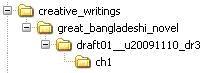
creative_writtings/great_bangladeshi_novel/draft01_u20091110_dr3/ch1
- Nest folders within folders: Create other folders within these main folders as need arises. For instance, a folder called “invoices” might contain folders called “2004”, “2005” and “2006”. A folder named for a client might include the folders “customer_data” and “correspondence”. The goal is to have every file in a folder rather than having a bunch of orphan files listed.
- Organize files by dates: Use a date in the document name. Such as dv20081215, this would mean December 15, 2008. This puts all the DV sent at that specific date together and sorted by date.
- Be specific: Give files logical, specific names and include dates in folder names if possible. The goal when naming folder is to be able to tell what the file is about without having to open it and look. So if the document is a letter to a customer reminding him that payment is overdue, call it something like “overdue20081206” rather than something like “letter”. How will you know who the letter is to without opening it?
- Don’t save unnecessary files: Be selective about the files you keep. You probably don’t need to keep them all. With e-mail, for example, you rarely need to keep everything you receive.
- Keep individual folder for a project: Keep your entire document related a project into a folder. So, you can take back up for a project and burn CD.
- Separate ongoing and completed work. To keep the Documents folder from becoming too unwieldy, use it only for files you’re actively working on. As a result, you can reduce the number of files you need to search through and the amount of data you need to back up. Every month or so, move the files you’re no longer working on to a different folder or location, such as a folder on your desktop, a special Archive folder, flash drive, external hard drive, or even on a CD.
- Use common names. To make it easier to search for documents, name your files and folders with easily found names, such as model numbers, project names, or the project lead in the title. Suppose every project should have proposal. So, named this file as “proposal.doc” something like this. Every project need images file so create a folder named “images” into your project folder. So, that every image is related on that project can be stored into that folder.
- Use shortcuts and shortcut links instead of multiple copies: If you need to get to the same file from multiple locations, don’t create copies of the file. Create shortcuts to it instead. To create a shortcut, right-click on the file and click Create Shortcut. You can drop and drag the shortcut to other locations. Moreover you may need to organize your folder such way like current working folders, folder of MD sir, folder of software department etc. Those folders may be categorized by different way. So you can create shortcut of those folders and organize several way.
- Cull your files regularly: Sometimes what’s old is obvious as in the example of the folder named “Invoices” above. If it’s not, keep your folders uncluttered by clearing out the old files. Do NOT delete business related files unless you are absolutely certain that you will never need the file again. Instead, in your main collection of folders in your data storing drive or root folder, create a folder called “Old” or “Inactive” and move old files into it when you come across them.
- Back up your files regularly. Whether you’re copying your files onto another drive or onto tape, it’s important to set up and follow a regular back up regimen.
- Put Reference on the desktop: Put a folder named “important_shortcut” on the desktop. Put your entire folders or files shortcut icon into that folder. So, you can save several clicks of the mouse to get where you want to be sooner.
Proposed convention for a well organized file or folder name:
The proposed file naming convention defines a readable, delimited, long filename format. The delimiting character is an underscore or hyphen. In all cases where an alphabetical character is called for, the character must be lower case. OS may be treat upper and lower case letters the same or not. The required contents of the filename will be as follows, in order: “File Name,[ Version Information, Create Date with Time, Last Updated Date with Time]” Additional information may be added as required by the user. The working group suggests that the additional information be in the following order: “Optional 1, Optional 2, and so on”. Additional information will add before optional information. If additional information exists there must be present optional information. The extension will always follow.
So the template for the file name is as follows –
[File Name]__[Additional Information]__[Optional Information].[Extension]
Here point to be noted that, delimiter is double underscore of each section. So, you can’t use double underscore into a section. You can use single underscore or single hyphen to delimit each word. Double hyphen is reserved for system purpose or automatically generated file name. And we discourage you to use single hyphen too.
File Name & Additional Information:
File Name will discuss later. Additional information is totally determined by user. And we discourage to use additional information because you have full right to make your own style file name.
Optional Information:
Optional information is consisting with “Create Date with Time and Last Updated Date with Time, Version Information”. For put create date you need to put leading ‘c’ and for update date you need to put ‘u’. You can give any one information. And total information is optional. But it good practice to put this information into your file name. But if you put this information you must follow the order and delimit each section with single underscore.
Each version number will followed by ‘v’ and then version number without any delimiter. Example: v1, v35. Please don’t use 01 or 02 just count from 1 and so on. This is also suggested to use ‘dr’ for draft version followed by revise number. You also suggested putting application version information though it’s optional. I suggest to use application version cause, we will easily recognize by file name to what version I need to use to open this file. I faced the problem when I use Adobe Illustrator or Photoshop. Please follow this order to form version information “application version, version/draft number”. Example: av11v5-3, av9v6, dr9 etc. Here version 5.3 represent as 5 hyphen 3. So, you can user hyphen as delimiter.
Using a date in the file name always state the date ‘back to front’. Why? Because then when you look at your folder and sort it by file name, all the files will sort in the order of the dates. It’s a super-easy way of organizing your files by date. Use four digit years, two digit months, two digit days, two digit hour and two digit minute (we will recognized this minute with NN): YYYYMMDDHHNN or YYYYMMDD or YYYYMM or YYYY or YYYYtoYYYY or MMtoMM or mMMdDD or mMMdDDtomMMdDD or hrHHmnNN
Extension:
Most programs automatically add the correct “file extension”—a 3-letter addition to the end of the filename that identifies the type of file to your computer (.doc = MS Word document; .wpd = WordPerfect document). In general, do not alter the file extension. If your program didn’t provide it automatically provide by yourself with your own standard and according your file type, format and by which program you want to open this file.
Example: (Some examples of good file names with their explanation)
| y2009_taxes_for_bob_smith__c20100121_u20100202.doc | Here you can’t start file name with number so I use ‘y’ and it also including optional information (create date and last date of modify) |
| personal_budget_2008__v1.doc | Here into optional information we put version information. |
| car_prices_2009.xls | No optional information |
| investment_notes_from_june_2007_course__av2007dr15.doc | It is creating by MS office 2007 and it’s a draft file that is revised 15 times till now. |
| js_daily_weight_200803__u20080401_v35.doc | Here we last update this file at April 1 of 2008 and its revised 35 times when update. |
| to_do_list__av2007v3.doc | The list of what to do today. |
The conventions comprise the following 18 rules:
- The default file name is determined by that file contains.
- The name is formed by taking the full expanded name of the unit and replacing the separating dots with hyphens and using lowercase for all letters.
- File names must not contain spaces or any special characters such as “& + # \ / : * ? ” ‘ < > | ! .” or non-alphanumeric characters.
- Do not start the file name with a number.
- When in doubt, keep the file name as short and simple as possible, but meaningful. For example use hist_100a_readings.html not hist100ab*readings
- Be sure to include the extension after the filename – for example .htm, .php, .doc, .xls, .pdf, .ppt, .psd, .ai, .jpg
- Avoid using four digit extension name of a file format.
- Avoid unnecessary repetition and redundancy in file names and file paths. Example: Good – http://www.eg.edu/business/sell/staff/, Redundant – http://www.eg.edu/business/sell/sellstaff/
- Use underscores or hyphens to delimit words, not spaces or capital letters.
- When including a number in a file name always give it as a two-digit number, i.e. 01-99, unless it is a year or another number with more than two digits.
- If using a date in the file name always state the date ‘back to front’, and use four digit years, two digit months, two digit days, two digit hour and two digit minute (we will recognized this minute with NN): YYYYMMDDHHNN or YYYYMMDD or YYYYMM or YYYY or YYYYtoYYYY or MMtoMM or mMMdDD or hrHHmnNN
- When including a personal name in a file name give the family name first followed by the initials i.e PR: Pronay Rozario
- Avoid using common words such as ‘draft’ or ‘letter’ at the start of file names, unless doing so will make it easier to retrieve the record.
- Order the elements in a file name in the most appropriate way to retrieve the record.
- The file names of records relating to recurring events should include the date and a description of the event, except where the inclusion of any of either of these elements would be incompatible with rule 8.
- The file names of correspondence should include the name of the correspondent, an indication of the subject, the date of the correspondence and whether it is incoming or outgoing correspondence, except where the inclusion of any of these elements would be incompatible with rule 8.
- The file name of an email attachment should include the name of the correspondent, an indication of the subject, the date of the correspondence, ‘attach’, and an indication of the number of attachments sent with the covering email, except where the inclusion of any of these elements would be incompatible with rule 8.
- The version number of a record should be indicated in its file name by the inclusion of ‘v’ followed by the version number and, where applicable, draft use ‘d’ followed by the version number. Also use application version (av) with their number by which the file created, except where the inclusion of any of these elements would be incompatible with rule 8.
Finally…
Everyone should have their own policy. But you must think about how can your public accessible file is more accessible in easy way, isn’t it?
For your information, I forgot my good hand writings. Really I missed those style…
Disclaimer:
This article is written for established a common concept for a well organized file structure. Many many thanks to Rahinur Rahman Reza of Square InformatiX Ltd. for his valuable comment on this article that easy for me to write it.
by-
| Md. Shahadat Hossain Khan
| Web Developer, Square InformatiX Ltd.